Corvic AI + Open AI Integration: Structured Data Example
This example demonstrates how to integrate Corvic AI with an OpenAI agent framework to analyze structured data from a parquet file containing video game sales information.
Use Case
In this tutorial, you'll upload a parquet file containing data about video game sales and ask Corvic to provide a report.
Prerequisites
- Download the CSV Dataset: Obtain the video game sales data from Kaggle.
- Convert CSV to Parquet: Use Python to convert the CSV file to Parquet format:python1234
- Upload to Corvic: Follow the documentation here to create an agent using this parquet file.
- Deploy the Agent: Deploy the agent and obtain the MCP endpoint and access token.
Question Asked
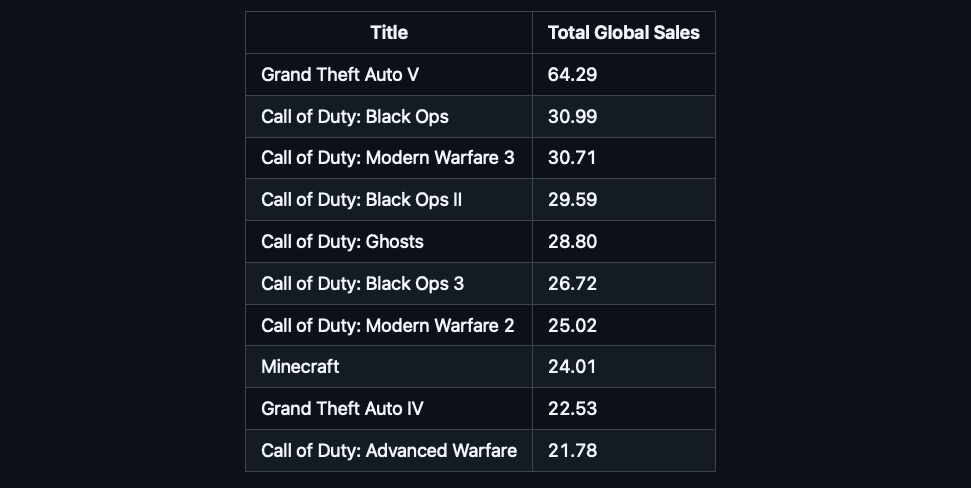
Group all the data by name and find the top titles by global sales. Output the name and the total global sales in a tabular format.The following Python code demonstrates the OpenAI agent setup:
python
1
2
3
4
5
6
7
8
9
10
11
12
13
14
15
16
17
18
19
20
21
22
23
24
25
26
27
28
29
30
Response
The Corvic agent will process the parquet data and return a report including the top-performing video game titles.
Notes
- Ensure that the
vgsales.parquetfile is correctly formatted and uploaded to the Corvic platform. - Replace
<MCP_ENDPOINT>and<YOUR_CORVIC_API_TOKEN>with your actual endpoint and token. - The agent is instructed to use tools exclusively for answering queries.
Need help? Contact support@corvic.ai or visit https://www.corvic.ai.